

Ever have one of those days when your to-do list looks like a monster and your brain just wants to crawl under a blanket? Meet your new secret weapon: the AI summarizer feature—your slightly nerdy, always-on sidekick. Forget the old AI content creation stereotype of cold, sterile efficiency. Today’s AI tools are more like creative partners: they breeze through the boring stuff, spark fresh ideas, and can even make learning or producing content a truly fun activity. Imagine finally checking things off faster—while always consulting the right info, no matter how long or messy the source.
Below are seven offbeat, totally practical—and yes, seriously fun—ways to use an AI summarizer that go way beyond “just making things shorter.” It’s not just about processing information faster; it’s about sharing it in formats that others actually want to read, watch, or experience.
Learn about more practical ways you could be using AI with our Learning Vault.
1. Campaign Chronicler—Automate Your Tabletop RPG Notes
Let’s kick things off with a twist on the classic “game night”—and don’t worry if you’ve never rolled a twenty-sided die in your life. Tabletop Role-Playing Games (RPGs) like Dungeons & Dragons are wildly popular, attracting everyone from lifelong fantasy fans to celebrities and even Fortune 500 execs. In fact, D&D alone boasts tens of millions of players worldwide, with livestreams and podcasts drawing huge audiences. But what exactly is a tabletop RPG? Simply put, it’s a collaborative storytelling game where players create characters and embark on adventures, all guided by a game master (often called a DM, or Dungeon Master).
The magic—and the chaos—happens when these stories stretch over weeks or months, becoming “campaigns.” Each session introduces new twists, decisions, and memorable characters (a.k.a. NPCs—Non-Player Characters, controlled by the DM). Pretty soon, keeping track of plot threads, clues, and quirky goblins can feel like a full-time job.
That’s where AI tools come in. If you’ve ever DM’d a campaign, you know the struggle: by session five, the plot’s a blur, half the NPCs have “mysterious” in their name, and your notes look like a tornado hit a crossword puzzle. Enter tools like Loreify and LoreKeeper, or even ChatGPT, which don’t just transcribe your session—they untangle the entire story. They pick out plot threads, plot twists, organize NPCs, and even flag “Lingering Questions” for next time.
By using AI, you now get to actually play instead of being the world’s most stressed secretary. The best part? You’ll never again lose track of that one goblin who accidentally became everyone’s favorite.
2. Digital Alchemist—Turning Dense Content Into Viral Hooks
Ever been handed a 40-page report and thought, “I’d rather eat a shoe than read this”? Same. But imagine you could zap that snoozefest into something people actually want to share—like a pithy LinkedIn post or a punchy tweet thread. With tools like Canva’s summarizer and Grammarly’s free summary engine, you can. I once took a dry academic article, ran it through an AI, and suddenly had a catchy “5 things you didn’t know” list, plus three topic ideas for future posts. It’s like having a translator who speaks “Internet” and finds ways to repurpose valuable content, turning one long-form piece into a dozen bite-sized gems.
Now let’s remember why this matters. As content creators (or even researchers), time is limited. Meanwhile, Google results and social media are an ocean of content all competing for a slice of your audience’s attention. According to Typeface, for every 100 minutes users spend online, they only dedicate nearly 36 minutes to social media. So not only is creation time scarce—attention is at a premium. How do you succeed in this ecosystem? How do you speed up the process without sacrificing quality?
“An AI text summarizer offers a solution to this marketing challenge. Rather than producing generic social posts that disappear into the digital void, AI tools can distill your most valuable insights into social media content that cuts through cognitive overload and captures attention during those critical moments.” – Akshita Sharma · Content Marketing Associate
But how do you actually use AI summarizers for viral content? A proven approach—shared by creators like Website Learners—is to break your process into clear, repeatable steps. First, choose a niche that excites you (think tech, music, sports, or whatever you love). Next, use other tools like Google Trends or Perplexity AI to spark ideas. Let your AI friend pull out the juiciest points from articles or transcripts—saving you hours. As you craft posts, think visually: pair key lines with strong images, memes, or short video clips. Keep your content punchy and add captions or voiceover for extra engagement. And above all, be consistent—
“Just posting one video and then putting all your hope onto it will not give you the best results. You’ll have to stay consistent with the same quality for all your videos and you’ll see the results” – Website Learners
Watch the full video here:
So, whether you’re looking to turn a dense research report into a viral YouTube Short or launch a TikTok trend, AI is your launchpad. Combine speed, relevance, AI and creativity—let the smart platforms do the heavy lifting so you can focus on what makes your voice stand out.
3. Reading Assistant—Conquering Your Digital Reading List
Raise your hand if you’ve got an eBook backlog that could double as a doorstop. (Guilty.) AI summarizers can turn that mountain back into a molehill. These tools do more than summarize—they let you chat with the text (“What’s the main argument?” “Give me three real-world examples.”). Some, like Decopy AI, even turn info into mind maps, so if you’re a visual thinker, you’ll actually remember what you read. Others like BooksAI offer 3 different summary types:
“… detailed summary (which generates the summary of the entire book), spoiler-free synopsis (which offers some information about the book without disclosing the main ideas or climax), and chapter summary (which summarizes one chapter). “
A friend prepped for a job interview this way—uploading PDFs and chatting with a 60-page manual in an evening. She landed the job. Coincidence? Maybe. But she said she felt way more confident walking in, and she surprisingly enjoyed the process of creating her personal AI tutor by only using these long-form documents.
4. Feedback Filter—Extracting Insights from Reviews
Imagine you’re running a new café and suddenly have 300 reviews to sort through—everything from “Best latte ever!” to “The bathroom soap smells weird.” AI summarizers, like Mopinion Smart Recaps, not only distill key themes but also structure the info so you can spot urgent issues (like that soap situation) fast, and provide your team with actionable insights. If you’re a data nerd, Google Vertex AI can spit out neat JSON files for dashboards. This google feature allows you to:
“… query a model directly and test the results returned when using different parameter values with the Cloud console, or by calling the Vertex AI API directly.”
And this not only works for businesses; if a college professor runs a feedback survey for an online course of 400 enrolled students, an AI platform with this feature can flag in less than an hour a recurring comment about “too many pop quizzes.” A professor working by himself would have totally missed that in manual reviews. One tweak later: happier students, better reviews, less stress.
5. Information Curator—Build Your Own Searchable “Second Brain”
Ever wish you could CTRL+F your own life? (Lowkey same). AI summarizers can actually help. Whether it’s voice notes, scribbled meeting ideas, or a podcast you heard on a walk, these tools let you turn chaos into a searchable “second brain.” I once lost a crucial quote from a recorded brainstorm—until my AI found it in seconds. Pro researchers build entire archives this way, so nothing slips through the cracks.
Honestly, it feels like cheating. But in a good way.
But it’s not just for the super-organized or academic types. Imagine never forgetting what your spouse asked you to pick up, always having the perfect comeback in group chats (because you remembered that hilarious fact from last month), or instantly recalling the name of that movie your friend recommended in 2019. The “second brain” concept is about storing all the stuff you want to remember, but with zero effort and zero sticky notes.
Here’s a look at just some of the creative—and yes, sometimes silly—scenarios where a searchable second brain could save your day (or your dignity):
|
Scenario
|
Setting
|
How a Second Brain Helps
|
|---|---|---|
|
Forgot your wedding anniversary…again?
|
Marriage/Relationship
|
Instantly pull up your partner’s key dates and gift wishlists before you’re in the doghouse!
|
|
Your boss asks, “What did we promise that client last quarter?”
|
Work/Meetings
|
Search every meeting note, call transcript, and email—no more awkward pauses or guesswork.
|
|
Someone says, “Remember that book I told you to read?”
|
Social Life/Book Club
|
Instantly retrieve every book, quote, or podcast anyone ever recommended.
|
|
Trying to recall your child’s favorite dinosaur (again)?
|
Parenting
|
Just search your parenting notes—T-Rex, Stegosaurus, and that phase with the Spinosaurus!
|
|
The group chat’s inside joke from 18 months ago resurfaces
|
Friends/Chats
|
Find (and screenshot) the original joke for maximum meme points.
|
|
You’re in a trivia night, and the answer was in a podcast you heard
|
Trivia/Bar Night
|
Search your podcast summaries for that obscure fact—victory (and bragging rights) secured.
|
|
“Honey, what did the plumber say last time?”
|
Adulting/Home Repairs
|
Quickly find all home maintenance advice and contacts without digging through old texts.
|
|
Forgot why you walked into a room?
|
Everyday Life
|
Okay, maybe AI can’t help with this one…yet. But hey, it can remind you what’s on your list!
|
|
Your pet’s weird medication schedule
|
Pet Parenting
|
Instantly check when Fluffy last took her anti-hairball pill.
|
|
Planning a surprise party & can’t remember who’s allergic to what
|
Event Planning
|
Search past party notes for dietary restrictions—no accidental peanut disasters.
|
|
Want to sound smart at dinner (“Did you know…?”)
|
Social/Impressing Others
|
Pull up odd facts you’ve stored from articles and podcasts.
|
|
Trying to recall your own New Year’s resolutions
|
Self-Improvement
|
Search what promises you made to yourself—and how many you’ve kept (or not!).
|
A second brain isn’t just about organization—it’s about peace of mind, less stress, and a lot more “wow, how did you remember that?” moments. No more sticky notes, no more frantic scrolling—just instant recall at your fingertips, for real life and real laughs.
6. Digital Hack—Mastering Reddit, Forums, and Massive Threads
If you’ve ever tried to catch up on a 2,000-comment Reddit thread, you know it’s somewhere between impossible and soul-crushing. Enter Glance, which plucks the “TL;DR” straight from the noise, highlighting key facts, expert takes, and even consensus mood.
Glance: I created an AI to summarize Reddit for you
byu/SpikeySanju inChatGPT
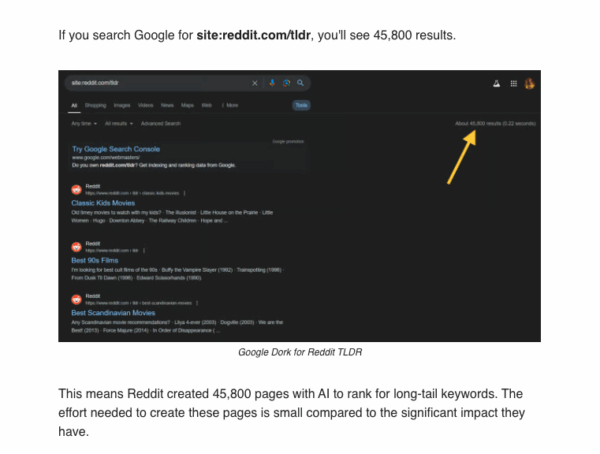
For me, the best part is skipping to the good stuff—no more scrolling through memes and flame wars just to find the answer. But for Reddit’s own team this represents something more business-minded! An all-in on AI-powered summaries to improve SEO and help users surf more efficiently. Not only humans find it difficult to get to the bottom of what an specific thread is about, also search engines find it “time consuming”. Here’s a short explanation of how on they identify what to summarize:
“TL;DR stands for Too Long; Didn’t Read and is perfect for an AI-generated summary.
Reddit uses AI to summarize all similar threads that satisfy the search intent.”
This is so genius and super creative!
7. Personal Advocate—Thematic Organization & Negotiation
Ever found yourself stuck writing a complaint, refund request, or (gulp) legal letter? One night, I uploaded a mess of emails and receipts to an AI summarizer and asked for a draft of a “polite but firm” notice for a refund. The result? A letter that got a response in two hours. No drama, just clarity. Others on Reddit have used AI to handle gym billing disputes and even to brainstorm app feature specs. For example, check out this Reddit answer to the question “What’s the most unexpectedly useful thing you’ve used AI for?” on r/ArtificialInteligence:
Comment
byu/Ausbel12 from discussion
inArtificialInteligence
It’s like having a calm, super-smart friend who isn’t afraid to be direct. In the same thread, someone else shared another super creative way they are using AI summarizer as a way to process large text for organization or thematic purposes:
Comment
byu/Ausbel12 from discussion
inArtificialInteligence
Before we wrap, let’s check out a couple bonus ways to squeeze more fun—and real value—out of AI platforms.
An AI-Way of Presenting Your Work
Think of Aurora Slides as the next evolution of an AI summarizer—it doesn’t just condense information for your own reference; it transforms your sprawling research or creative project into a beautiful, logical presentation, ready to share with the world. For example:
Imagine you’re a grad student with a 40-page thesis, and the department asks you to present your findings at a conference. Instead of spending days wrestling with PowerPoint or trying to whittle your paper down with an AI PowerPoint Summarizer, you simply drop the document into Aurora Slides. With a straightforward prompt (“Summarize my research for a 10-minute academic talk”), Aurora instantly pulls out your main arguments, key visuals, and supporting data—then assembles it all into a polished, story-driven slide deck. You can tweak the tone, add notes, or swap out sections—all using natural language. What once took a weekend of late-night edits now takes minutes.
Or maybe you’re a marketing strategist with a massive campaign report. You need to show results to the C-suite—fast! There’s no time to sift through public presentation tips or hunt for the perfect template. Aurora Slides is built ready. It ingests your long-form report and, like an AI-powered magician, delivers a crisp, executive-level presentation that spotlights wins, lessons, and next steps. No more hunting for the “so what?”—Aurora gives you a deck that makes the impact immediately clear.
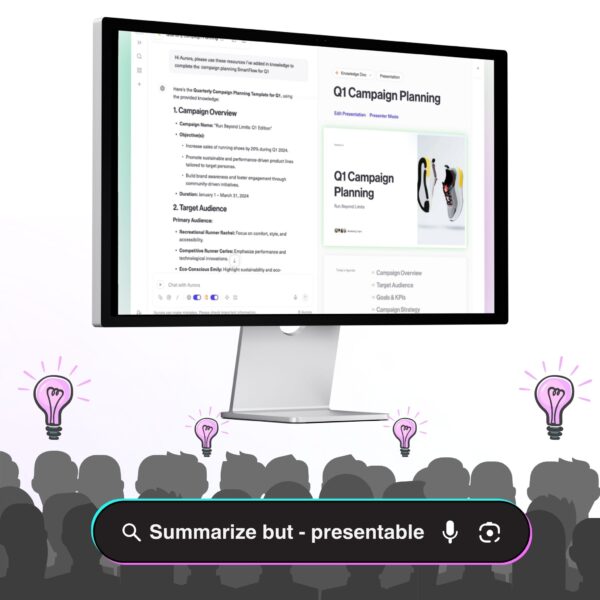
Aurora Slides is an AI deck builder that does what a traditional AI summarizer can’t: it leapfrogs from “TL;DR” to “show, don’t tell”—so when you need to present, pitch, or persuade, your ideas look and sound their best.
YouTube Recs—Top 5 AI Summary Tools
YouTube isn’t just for cat videos and conspiracy theories (no shade we all end up there sometimes). In the review “Top 5 BEST YouTube AI Summary Tools (Better than ChatGPT),” the creator breaks down five tools that make learning from videos way easier:
- Monica: Instant on-page YouTube summaries (great for quick skims)
- MyMap: Converts videos to mind maps—you’ll love it if you’re a visual learner
- Otio: Best for deep research, lets you chat with and search video content
- Readwise Reader: Syncs highlights/transcripts to your notes (for the A+ student type)
- Recall: The reviewer’s top pick—summarizes, builds flashcards, and creates knowledge graphs for the most actionable, connected learning
What stuck with me was how each tool fit a different style: Recall for connecting ideas, Otio for researchers, MyMap for visual folks. You should use AI to run a more detailed comparison by pasting each of the tools’ website links in a chat and ask away!
Watch the full video here:
The Future of Content—Don’t Invent Cold Water, Drink It
Here’s my favorite mental image: Google is fast becoming a system of “digital agents” that summarizes the web for you. So why fight it?
There’s an old saying—“don’t invent cold water”—that folks use when someone’s trying too hard to come up with something new when the perfect solution already exists. If you’re thirsty, you don’t build a fridge, freeze a river, and wait for the ice to melt. You just pour yourself a glass and drink. The smart move isn’t to reinvent what’s already working—it’s to use it and build on it.
That’s exactly what’s happening with AI summarization. The future of search, content, and even creativity is about serving up the “cold water”—the clearest, quickest distillation of what matters. Instead of resisting, criticizing, or waiting on the sidelines, jump in. Ride the wave that’s already refreshing the whole digital world.
Want a new hobby? Start a TikTok channel with daily AI-generated city news. Or launch a newsletter with the best “short takes” on trends. Cold, clear, and ready for you: it’s time to take a sip, not reinvent the glass.
A Few Reddit Opinions…
Reddit is where the excitement—and the brutal honesty—lives. Real users swap tips on tools: Gemini for speed, Recall and Glasp for knowledge management, QuillBot for fast paraphrasing…
But not all tools can properly handle certain X amount of pages:
Comment
byu/paulrchds6 from discussion
inNoteTaking
Niche tools like Grasp and Recall are called “GREAT” for their specific use cases. But the community also keeps it real: even the best AI stumbles, it could be on full-length novels or deeply nuanced content. The upshot? There’s a tool for every kind of thinker, but knowing your own workflow is half the battle.
Prompt Engineering & Giant File Summaries
Ready to geek out? The true magic behind AI summarizers is all in the prompt. The more specific you are, the better the results: ask for bullet points, adopt a persona (“explain this like I’m five”), or request a custom format like JSON if you’re a developer. When you’re up against a massive file—think entire books or giant reports—don’t panic. Use the Map-Reduce method: break the text into chunks, summarize each section, and then combine those summaries into a cohesive overview. Effective prompt engineering is crucial for guiding the AI to include exactly the information you need.
If you’re working with a huge document, consider asking AI to first outline or break down the material—then decide which chapters or sections deserve the spotlight and craft your AI prompts accordingly. This lets you stay focused and saves time.
Prompt engineering isn’t just for summaries, either. Once you get the hang of it, you can use AI for everything from lesson plans to creative brainstorming—unlocking new workflows and ideas you might not have imagined.
Pro tip: If you’re just getting started, check out this amazing resource for beginners (clear language, step-by-step examples): Google Prompt Engineering Guide Breakdown.
Conclusion
AI tools with features for summarizing are more than just digital scissors—they’re creativity boosters, sanity savers, and sometimes, a little bit of magic. Your next idea, project, or side hustle might be hiding in a pile of raw info—so why not let AI do the heavy lifting? Try a few of these fun hacks and see what happens. The future’s looking refreshingly short and sweet.
Frequently Asked Questions (FAQs)
What’s the best AI summarizer for students?
A: It depends—Recall, Gemini, Readwise Reader, Aurora, and ChatGPT 5; are all worth a shot since all these have “knowledge- related” features.
Can AI summarizers handle handwritten notes or audio?
A: Absolutely, there’s an AI for that! ChatGPT 5, Notta and PKMS are some tools leading the way. For more specific instructions scroll throuhg: AI Prompts for Generating PowerPoint Slides from a Manuscript and copy the prompts that might work for the type of content you want to generate.
How can I use AI summarizers in my creative workflow?
A: Use AI summarizers for any task that requires sorting through lots of information—whether it’s research, brainstorming, or even creating your own “TL;DR” newsletter. Think about what you want from a tool: just summaries, or actionable insights? Test different options to see which fits your end goal and unique creative process.
How do I integrate AI into my creative writing?
A: Start by mapping out your writing process and the phases where AI could help—like outlining, drafting, or editing. Consider making a simple spreadsheet to track different tools, features, and free trial notes. Try a few, leave feedback for yourself, and highlight the ones that truly support your style. Ultimately, choose tools that align with your creative voice and workflow.
Are there privacy risks?
A: Always check the tool’s privacy settings, especially if dealing with sensitive info related to your job. This is Aurora’s Privacy Page so you get an idea of what to expect.
What makes Aurora Slides different from other presentation tools?
A: Aurora Slides uses AI to instantly transform your notes, research, unstructured data, or even transcripts into polished, story-driven presentations—no design skills required.
Can I collaborate with others on a deck in Aurora Slides?
A: Yes! Aurora Slides offers real-time collaboration and sharing features, so you and your team can refine and present together, wherever you are.